U.S. Legal in Most States • Discreet Shipping • Real-World Protection • No Permits Required in Most Areas

Nanny Cams -- Discreet Home Monitoring Cameras

Leaving your kids with someone else is one of those things most parents do without a second thought — right up until they have a second thought about it. Whether you’re checking in on a new sitter, monitoring a regular caregiver, or just wanting a record of what’s happening in a common room while you’re at work, a small hidden camera does the job quietly. No big installation, no obvious hardware. Just a normal-looking object that happens to be recording.

Discreet Cameras for Home Monitoring

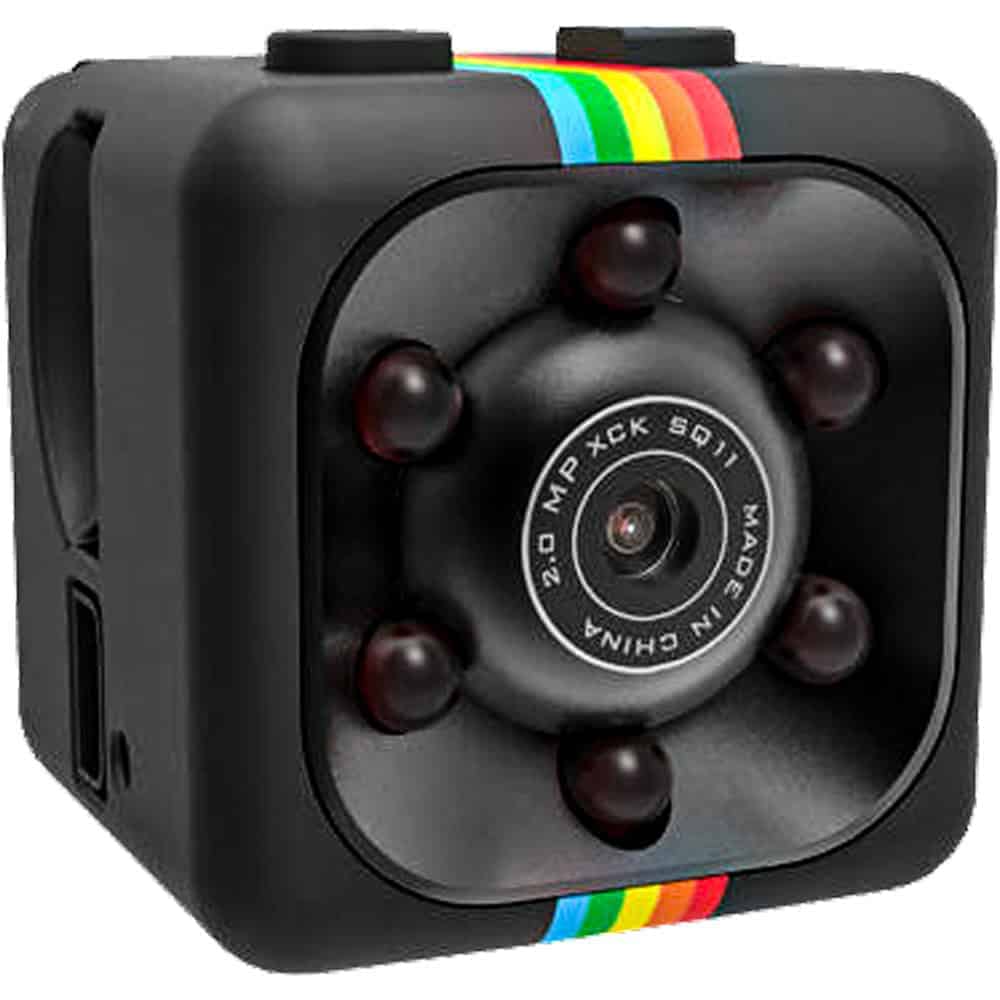
One of the smallest cameras available -- motion-activated with built-in DVR, easy to place on a shelf or surface without drawing attention.
Looks exactly like a USB wall charger -- plugs into an outlet in any room, stays plugged in, and records without anyone noticing it's a camera.
1080P HD video hidden in a working pen -- records in any orientation, easy to position on a desk or shelf for room-level monitoring.
Tiny spy camera hidden inside a miniature crucifix -- wearable as a necklace or placed on a surface, completely inconspicuous in most home settings.

What to Look for in a Nanny Cam

Built-in DVR vs. streaming. Most of the cameras here have a built-in DVR that records to a memory card. No network required, no app to set up, no footage stored in a cloud you don’t control. For a lot of parents that’s the simpler and more private setup. You pull the card, review the footage. Done.

Motion activation. The Mini Hidden Spy Camera and most models here support motion activation, which means the camera only records when something is actually moving in the frame. That saves storage space and makes it easier to find relevant clips without scrubbing through hours of empty-room footage.

What it’s disguised as. The USB charger model is probably the most convincing for home use — everyone has chargers plugged into walls. Nobody looks twice. The mini camera can go on a shelf next to books or plants. The pen works on desks. Pick something that fits naturally in the room you’re monitoring.

Video resolution. The HD Pen Camera records at 1080P, which gives you clear, usable footage. Lower-resolution cameras can be harder to identify faces or read details. If the whole point is a clear record, resolution matters.

Placement and angle. Think about where the camera will actually point before you set it up. A camera on a shelf at eye level facing a couch or play area will cover the space you care about. A camera pointing at the ceiling or wall is just wasting storage.

How to Set Up and Use a Nanny Cam at Home

The USB Charger model is probably the easiest to deploy — plug it into an outlet in the room you want monitored, insert a memory card, and it’s ready. The charger looks completely normal in any room with electronics, which describes most living rooms and playrooms.

For a shelf or desk placement, the mini camera or pen camera give you more flexibility on angle. Set it on a surface at roughly the right height for the space you’re watching, aim it at the area of interest (play area, couch, main floor), and tuck it naturally among other items.

Be aware of your state’s recording laws — most states allow recording in your own home, but some have rules about audio recording without consent. Checking that before you set up is worth five minutes of your time. Our Laws & Restrictions page at https://stunmaster.com/law-and-restrictions/ has a general overview.

Frequently Asked Questions

A: In most states, recording video in your own home is legal. The rules get more complicated with audio — some states require that all parties being recorded consent to audio recording. Generally, video-only recording in common areas of your home is permitted, but laws vary by state. See our Laws & Restrictions page at https://stunmaster.com/law-and-restrictions/ for more specifics, and if you’re uncertain, check with a local attorney.

Q: Do I need to tell my nanny or babysitter I have a camera?

A: That depends on your state and what type of recording you’re doing. Most states don’t require you to disclose video-only cameras in your own home, but audio recording consent laws vary significantly. Some parents choose to disclose cameras openly — it can actually improve caregiver behavior and removes any legal uncertainty. Others prefer to keep them discreet. Either way, knowing your local laws first is the right starting point.

Q: Where is the best place to put a nanny cam?

A: Wherever the main caregiving activity happens — typically the living room, playroom, or main floor common area. A shelf or surface at eye level works well for most of these cameras. The USB charger model is particularly useful because it can go anywhere there’s an outlet without looking out of place. Avoid placing cameras in bathrooms or bedrooms used by the caregiver — that creates legal and ethical issues regardless of your state.

Q: Do nanny cams require WiFi or an app?

A: The cameras here use built-in DVR with a memory card — no WiFi, no app, no cloud account required. You insert a memory card, the camera records to it, and you pull the card to review footage. That’s simpler for most home setups and keeps footage private on your own device. If you specifically want remote viewing via your phone, you’d want a WiFi-connected camera, which is a different category.
Q: How long will a nanny cam record on a memory card?

A: It depends on card size and whether motion activation is enabled. With motion activation on, the camera only records when something moves in frame, which can extend a 16GB card to several days of monitoring. Continuous recording fills cards faster. Most of these cameras use standard micro SD cards that are widely available. Check the specific camera model for its maximum supported card size and plan accordingly.

Not Sure Which Nanny Cam Is Right for Your Home?

Call us at 800-859-5566 -- we can help you pick the right model based on your room layout, what you're trying to monitor, and how technical you want to get with the setup.

Shop All Hidden Cameras

YOU’RE IN!

15% OFF

Use this code on every order

🎉

Here’s Your Code!

Use it now an on every future order.

YOUR DISCOUNT CODE

SAVE15

We also sent this code to your email for safekeeping.

EXCLUSIVE OFFER

15% OFF

Every order – not just your first!

Unlock Your Discount Instantly

Enter your email below and your personal 15% discount code appears right here – no need to check your inbox.

🔒 We respect your privacy. Unsubscribe anytime.